

Accessing the Xpress Workbench Component
Logging in to FICO® Platform
When an organization subscribes to FICO Platform, it will normally provide a list of permitted users when the contract is signed, which is used by FICO Professional Services to create the accounts and configure permissions. Users will be provided with the URL to directly access the application. FICO Professional Services will fully prepare the environment ready for use. Xpress Insight is implemented as a component instance of a solution on FICO® Platform. After the Xpress Insight component is successfully provisioned, authorized users can access Xpress Insight through the FAC.
If you do not interact with the component for 30 minutes, you are automatically logged out. A warning message appears five minutes before this happens.
If the component is logged out and unused, including not running or debugging any Mosel models, for a period of 1.5 - 2 hours, then the component is placed in an Idle state. When the component is next accessed, it reawakens the component before a user can log into it; this takes up to around a minute. During this time, if you access the component directly using its URL (for example, using a web browser bookmark), you might see a plain text message on the screen telling you that the component is Idle. In this case, wait and then refresh the browser.
Basic Operation of the Component on FICO® Platform
Users with Administrative rights will have the Create Project option available from the dashboard page.
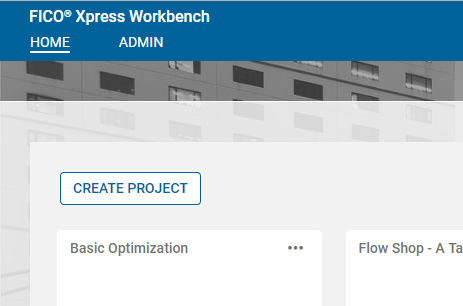
This button creates a new project containing the files for a minimal Xpress application.
- Create a zip archive on your local computer containing all your project files.
- Click CREATE PROJECT.
- Enter a name for your project.
- Click CHOOSE FILE and select the zip archive you created.
- Click SAVE.
- Click the new project tile to open it.
© 2001-2026 Fair Isaac Corporation. All rights reserved. This documentation is the property of Fair Isaac Corporation (“FICO”). Receipt or possession of this documentation does not convey rights to disclose, reproduce, make derivative works, use, or allow others to use it except solely for internal evaluation purposes to determine whether to purchase a license to the software described in this documentation, or as otherwise set forth in a written software license agreement between you and FICO (or a FICO affiliate). Use of this documentation and the software described in it must conform strictly to the foregoing permitted uses, and no other use is permitted.